
Download notesGPT – AI Voice Note Management Tool for Efficient Summaries & Tasks
Overview
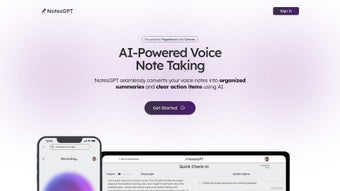
notesGPT is a cutting‑edge, web‑based AI application that transforms raw voice recordings into clear, structured summaries and instantly extracts actionable tasks. Built on advanced natural‑language processing models, the platform listens to your spoken ideas, meetings, lectures, or brainstorming sessions, then produces concise text that highlights the most important points. By automatically turning spoken content into readable notes and a to‑do list, notesGPT helps professionals, students, and anyone who relies on voice memos to stay organized, reduce manual transcription effort, and boost overall productivity. The open‑source nature of notesGPT, with its full codebase hosted on GitHub, ensures transparency, security, and the flexibility to customize the tool for specific workflows or integrate it with existing productivity suites. Whether you’re using a Windows laptop, a macOS desktop, an Android phone, or an iOS tablet, notesGPT runs in any modern browser, making it a truly cross‑platform solution for voice note management.
Core Features
- Automatic Voice‑to‑Text Conversion: Real‑time transcription of audio files or microphone input with high accuracy, supporting multiple languages and accents.
- Intelligent Summarization: AI‑driven summarizer condenses long recordings into short, readable paragraphs that capture key ideas.
- Task Extraction Engine: Detects verbs, deadlines, and responsibilities within the summary and creates a clear list of actionable items.
- Multi‑Platform Accessibility: Runs entirely in the browser, compatible with Windows, macOS, Linux, Android, and iOS without the need for additional installations.
- Secure Cloud‑Free Operation: All processing can be performed locally in the browser, ensuring that sensitive voice data never leaves your device unless you choose to sync.
- Open‑Source Flexibility: Full source code available on GitHub, allowing developers to tweak algorithms, add custom integrations, or contribute to the community.
- Export Options: Export summaries and task lists to plain text, Markdown, PDF, or directly to popular task‑management tools via webhook.
- Batch Processing: Upload multiple recordings at once and receive consolidated summaries with separate task sections for each file.
Installation, Usage & Compatibility
Because notesGPT is a web‑based service, there is no traditional installation process. Getting started takes just a few minutes:
- Visit the official notesGPT website (or the GitHub Pages demo) using any up‑to‑date browser (Chrome, Edge, Firefox, Safari).
- Click the “Get Started” button to load the main interface. The first time you open the app, the browser will ask for microphone permission—grant it to enable live recording.
- To transcribe an existing audio file, drag and drop the file into the upload area or use the “Choose File” button. Supported formats include MP3, WAV, OGG, and AAC.
- Press the “Transcribe & Summarize” button. notesGPT will process the audio, generate a text summary, and automatically list any detected tasks beneath the summary.
- Review, edit, or refine the output as needed. You can copy the text, download it as a PDF/Markdown file, or push it to a task manager using the provided webhook URL.
Compatibility is a strong point of notesGPT. Since the core engine runs in JavaScript and WebAssembly, it works seamlessly on:
- Windows 10/11 (any modern browser)
- macOS Monterey and later
- Linux distributions with recent browsers
- Android 9+ (Chrome or Firefox)
- iOS 14+ (Safari or Chrome)
For power users who prefer a self‑hosted solution, the GitHub repository includes Docker instructions. By pulling the Docker image and exposing port 8080, you can run notesGPT on a private server, ensuring complete control over data handling and compliance requirements.
Overall, the installation experience is frictionless, and the tool’s cross‑platform nature means you can switch between desktop and mobile without learning new interfaces.
Pros and Cons
- Pros:
- Fast, accurate transcription with AI summarization.
- No need for bulky desktop software—runs in any browser.
- Task extraction saves time by turning ideas into actionable items automatically.
- Open‑source transparency and the ability to self‑host for privacy‑focused users.
- Multiple export formats and webhook integration for workflow automation.
- Cons:
- Performance depends on device CPU; very large audio files may take longer on older hardware.
- While most languages are supported, accuracy for niche dialects may vary.
- Advanced customization (e.g., custom summarization length) requires editing the source code.
- No native mobile app yet—reliance on browser may be less convenient for some users.
Frequently Asked Questions
Is notesGPT completely free to use?
Yes, the core web application is free. The open‑source code can be downloaded, modified, and self‑hosted at no cost. Optional premium features, such as cloud storage sync, may be offered in the future, but the basic transcription, summarization, and task extraction are fully free.
How secure is my audio data?
When you use the browser‑based version, all audio processing happens locally in your device’s memory. No recordings are uploaded to external servers unless you explicitly choose to sync or share them. For added assurance, you can self‑host the application behind your own firewall.
Can notesGPT handle multiple speakers?
The underlying speech‑to‑text model supports speaker diarization, meaning it can differentiate between two or more voices in a single recording. The summary will reflect each speaker’s contributions, and tasks are extracted regardless of who said them.
What audio formats are supported?
notesGPT accepts MP3, WAV, OGG, AAC, and FLAC files. If your recording uses a less common format, you can convert it with free tools like Audacity before uploading.
Is there a way to integrate notesGPT with my existing task manager?
Absolutely. notesGPT provides a webhook endpoint that can push extracted tasks directly to services such as Todoist, Trello, Asana, or Microsoft To‑Do. You just need to paste the incoming webhook URL in the settings panel.
Conclusion & Call to Action
In a world where voice memos are increasingly common, notesGPT stands out as a powerful, yet simple, solution that bridges the gap between spoken ideas and actionable written plans. Its AI‑driven summarization and task extraction eliminate the tedious manual transcription step, letting you focus on execution rather than note‑taking. The fact that it runs entirely in the browser, combined with an open‑source license, makes it both accessible and trustworthy for privacy‑conscious users.
If you’re looking to streamline meeting minutes, lecture notes, or personal brainstorming sessions, give notesGPT a try today. Simply navigate to the official site, grant microphone access, and start converting your voice into organized text and clear tasks within seconds. For teams that need tighter integration, self‑host the Docker image and connect the webhook to your preferred project‑management platform. The free, secure, and cross‑platform nature of notesGPT means there’s virtually no downside to experimenting with it.
Ready to boost your productivity? Download notesGPT now and experience AI‑powered voice note management for yourself. Your next meeting’s action items are just a click away.



.png)



